
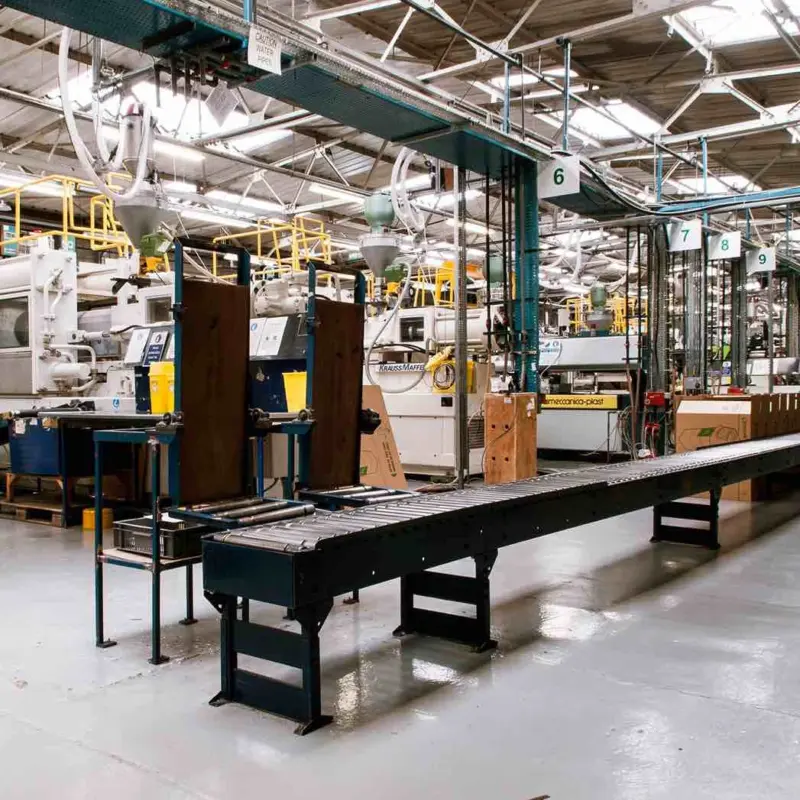
If you have automated equipment, you interact with a human machine interface on a daily basis. It’s the screen that shows what your machines are doing and lets you control them. A good HMI makes your line easier to run. A poor one slows you down and hides problems. As automation becomes increasingly complex, the interface becomes just as important as the hardware behind it. In this guide, you will learn what an HMI is, how it works, and why it matters when you design, upgrade, or buy industrial automation systems for your production line.
What Is a Human Machine Interface (HMI)?
A human machine interface, or HMI, is the hardware or software that connects you to the machines and controllers on your production line. It shows real-time machine data, alerts, and trends while letting you control operations, adjust settings, and respond to alarms. HMIs can be simple panels with buttons and indicator lights, touchscreens on equipment, or industrial PCs with software that visualizes complex processes. They are essential in industrial automation for monitoring, controlling, and optimizing processes efficiently.
Why HMIs Matter:
Well-designed HMIs make it easier to understand what is happening across your line at a glance. They reduce the need to check multiple devices or systems manually, help you make faster decisions, and lower the risk of operator error. These benefits are critical for safety, uptime, and overall efficiency.
This video explains the fundamentals of HMIs, showing how they let operators monitor and control machines and work alongside PLCs through industrial protocols.
What Does an HMI Actually Do?
An HMI gives you real-time visibility into what your machines are doing. It shows live data such as temperatures, pressures, production counts, and machine status, so you can monitor performance without walking the floor. Modern HMIs gather information from controllers and sensors and present it in charts, graphics, and dashboards that are easy to interpret.
Real-Time Monitoring and Control:
With an HMI, you can start and stop equipment, adjust setpoints, and change operating parameters directly from the interface. It acts as the central point for operator control, replacing manual switches and indicator lights with intuitive visual outputs.
Alarm Handling and Diagnostics:
HMIs alert you to abnormal conditions and help you diagnose problems quickly. Alarm management features display warnings and faults so you can take corrective action before a small issue turns into downtime.
Data Visualization and Logging:
In addition to live data, HMIs log events and display trends over time. This historical data helps you analyze performance, spot recurring issues, and make better decisions with less guesswork on the shop floor.
Where You’ll Find HMIs in Manufacturing:
HMIs appear throughout your production line, giving you control and visibility wherever you need it. On the shop floor, you might see machine-mounted touch panels that let you start, stop, and adjust equipment directly. Robot teach pendants provide operators with intuitive control over robotic arms and cobots. In larger facilities, central control room screens consolidate data from multiple machines, giving you a complete overview of the line. Mobile dashboards are also becoming common, letting supervisors and engineers monitor operations remotely. HMIs can be simple panels or complex, networked systems that handle multiple processes at once, making your workflow more efficient and reducing errors.
Key Components of an HMI System:
An HMI system is made up of several layers that work together to help you monitor and control machines. At the base level is the HMI hardware. This includes industrial panels, panel PCs, and touchscreens that show data and let you interact with your system. These devices are built to withstand factory environments and keep running reliably.
HMI Software:
The software you run on that hardware turns raw machine data into visual screens, charts, and buttons. It provides tools to build interfaces, configure alarms, and log information. Good HMI software makes complex data understandable and usable during daily operations.
Controllers and Integration:
The HMI connects to controllers like programmable logic controllers (PLCs). PLCs act as the “brain” of your automation and execute the logic that drives machines. The HMI visualizes what the PLC is doing and lets you send control inputs back to it.
Communication Layer:
Communication protocols such as OPC UA, Modbus, and Ethernet/IP ensure data flows smoothly between hardware, controllers, and software. These standards help your system stay interoperable and responsive to real-time demands.
HMI vs SCADA vs PLC (Quick Clarifier Section):
When you work with automation systems, you will hear HMI, SCADA, and PLC. These terms are related but they are not the same. Knowing the difference helps you choose the right components for your line.
What a PLC Does:
A programmable logic controller (PLC) is the control logic of a machine or process. It reads sensors, makes decisions based on programmed logic, and sends commands to outputs like motors and valves. PLCs are rugged and designed for real-time control. In fact, PLCs are used in over 70 percent of industrial control systems worldwide.
What an HMI Does:
An HMI is the interface that lets you see what the PLC is doing and interact with it. It shows data, trends, status, and alarms. It does not make control decisions by itself.
What SCADA Does:
Supervisory control and data acquisition (SCADA) systems take a broader view. SCADA collects data from many PLCs and devices across a plant or multiple sites. It logs information, handles alarms, and lets you supervise operations at scale.
Quick Comparison:
| Component | Main Role | Typical Use |
| HMI | Interface | Shows machine status and accepts operator input |
| PLC | Control logic | Runs automation code and controls devices |
| SCADA | System-wide supervision | Centralized monitoring and data collection |
This clear difference helps you design systems that are easier to operate and maintain.
Why HMIs Are Critical in Modern Automation?
In modern manufacturing, HMIs help you see what your machines are doing and make faster decisions. They provide real-time monitoring and control of key process parameters, replacing the old need for manual checks and paper logs. This means you can spot issues early and take action before they become downtime events. HMIs also support alarm handling and diagnostics that clear up confusion quickly and keep your line running smoothly.
Faster Troubleshooting and Reduced Downtime:
With real-time visuals and alerts, you spend less time guessing what went wrong. Modern manufacturing analytics tied to HMI systems can help reduce unplanned downtime by up to 50 percent through better predictive insight.
Better Visibility and Safety:
HMIs give you centralized dashboards that show machine status, trends, and alarms in one place. This improves operator awareness, supports lean manufacturing, and aligns with Industry 4.0 goals of smart, data‑driven operations. Modern automation environments increasingly depend on HMIs to bridge operators and connected machines, making decision‑making faster and more informed.
Common HMI Use Cases:
HMIs are used across a wide range of industrial applications to help you monitor and control processes efficiently.
1. Machine Tending:
Operators use HMIs to load, unload, and supervise automated machines. For example, an HMI on a CNC machine allows you to track cycle times, adjust feed rates, and manage alarms in real time. This reduces errors and keeps production consistent.
2. Packaging Lines:
HMIs streamline packaging operations by displaying line speed, fill levels, and packaging counts. You can quickly adjust settings to match product size or batch requirements, minimizing downtime and waste.
3. Process Industries:
In water treatment, pharmaceuticals, and energy production, HMIs monitor complex parameters such as temperature, pressure, and chemical levels. They help you maintain quality standards and regulatory compliance.
4. Robotics Cells:
Robot cells rely on HMIs for programming, status monitoring, and troubleshooting. You can see each robot’s task status and adjust operations without stopping the entire cell, increasing throughput and safety.
What Makes a Good HMI (When Buying)?
When you are selecting an HMI for your production line, focus on features that make your operators’ job easier and your processes more reliable.
Usability for Operators:
A good HMI is intuitive and reduces training time. Interfaces that are simple to navigate can cut operator errors by up to 30 percent and improve response to alarms. [1]
Clarity of Visualization:
Screens should display data clearly, using graphs, color coding, and alerts that highlight critical conditions. Well-organized visualization lets you quickly assess machine health and production status.
Integration with Existing PLCs:
Your HMI should connect seamlessly with the PLCs controlling your equipment. This ensures real-time data exchange and prevents compatibility issues when adding new machines.
Remote Access Capabilities:
Modern HMIs allow you to monitor operations from a tablet or smartphone. Remote access improves flexibility and supports faster decision-making during off-hours.
Alarm Management Quality:
Alarms must be prioritized and easy to interpret. Effective alarm management helps operators respond to urgent events promptly, reducing downtime and improving safety.
Modern HMI Trends to Watch:
Industrial HMIs are evolving as factories adopt more connected and intelligent systems. Understanding these trends helps you choose interfaces that make your operations faster, safer, and more flexible.
Web‑Based and Cloud‑Ready Interfaces:
Web‑based HMIs let you access machine data and controls through a standard browser on PCs, tablets, or phones. This reduces installation time and allows you to scale interfaces across multiple sites. Cloud-ready systems also make it easier to deploy updates centrally and monitor multiple lines at once. [2]
Remote Monitoring and Mobile Access:
Modern HMIs support remote monitoring so you can track machine status, alarms, and trends outside the plant. This improves response times and reduces downtime by ensuring critical events are addressed quickly. [3]
AI‑Assisted and Predictive Features:
AI is being integrated into HMIs to highlight critical trends, predict faults, and reduce operator overload. Predictive insights allow you to act before problems escalate, improving efficiency and reliability. [4]
Natural Language and Adaptive Interfaces:
Emerging HMI systems are starting to support natural language commands, letting operators issue instructions using speech or text. Adaptive interfaces adjust screens based on role, context, and operator behavior, showing only the most relevant data to reduce cognitive load.[5]
These trends are pushing HMIs from static dashboards to intelligent, flexible tools that help you make faster, clearer, and safer decisions on your production line.
Conclusion:
Human machine interfaces are more than screens on your machines. They are the connection between you and the processes that drive your production line. A good HMI gives you real-time visibility, simplifies decision-making, and reduces errors and downtime. As automation grows, HMIs are evolving with web access, AI features, and adaptive interfaces that make operations smarter and safer. When selecting or upgrading an HMI, focus on usability, integration, and alarm management to ensure it meets your needs today and can grow with your line. The right interface turns complex automation into clear, actionable insights for you and your team.
References:
- Mustafa, F. E., & Ali, P. R. (2022). Human‑machine interfaces and operator performance. MDPI Machines, 13(4), 267. Retrieved February 23, 2026, from
https://www.mdpi.com/2075-1702/13/4/267 - MarketsandMarkets. (2025). Human Machine Interface Technology Market by Component, Type, Vertical, and Region – Global Forecast to 2030. Retrieved February 23, 2026, from
https://www.marketsandmarkets.com/Market-Reports/human-machine-interface-technology-market-461.html - Meticulous Research. (2023). Interface evolution and the future of human machine interface technology. Retrieved February 23, 2026, from
https://www.meticulousresearch.com/blog/346/interface-evolution-exploring-the-human-machine-interface - ARC Advisory Group. (2024). Human machine interface (HMI) software and services market analysis. Retrieved February 23, 2026, from
https://www.arcweb.com/market-analysis/human-machine-interface-hmi-software-services - Emerging HMI interaction research (2025). Natural language and adaptive interfaces for industrial systems. Retrieved February 23, 2026, from
https://arxiv.org/abs/2506.04980
What is Force Limiting in Cobots?
Collaborative robots, or cobots, operate in shared human workspaces. This capability requires robust safety mechanisms. [...]
Mar
Structured Light vs. Time-of-Flight Cameras
Depth sensing enables robots to perceive the three-dimensional structure of their surroundings. It supports tasks [...]
Mar
Human Machine Interface Explained
If you have automated equipment, you interact with a human machine interface on a daily [...]
Feb

Why Most Humanoid Robots Lack AI Stacks
Humanoid robots are robots built to look and move like humans. They usually have two [...]
Feb

January 2026 Humanoid Robot Launches
January marked a major milestone for the humanoid robotics sector, as several leading manufacturers unveiled [...]
Jan

Top 5 Humanoid Robot Trade Shows 2026
Humanoid robots are multiplying fast. Companies are taking unique approaches to solve real-world problems. In [...]
1 Comments
Jan